Click-to-WhatsApp Ads: A Complete Guide for Local Businesses
Posted Date : 13 Jul 2026
If you run a local business—a clinic, a salon, a real estate agency, a repair shop, anything where customers naturally want to "just ask a question" before buying—Click-to-WhatsApp Ads (CTWA) are one of the most effective ad formats available in 2026. Instead of sending someone to a slow landing page or a form they'll abandon, the ad drops them straight into a WhatsApp conversation with your business. No forms, no redirects, no friction.
Here's exactly how it works and how to set it up, step by step.
Step 1: Understand what Click-to-WhatsApp ads actually are
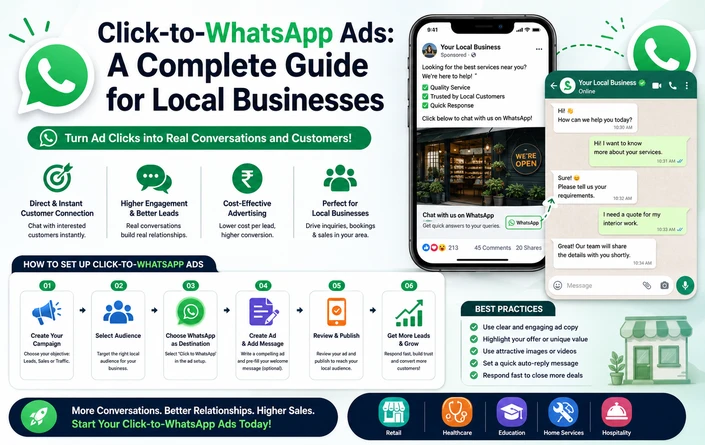
A Click-to-WhatsApp ad is a Meta ad — shown on Facebook, Instagram, Messenger, Reels, or Stories — with a call-to-action button like "Send Message" or "Chat on WhatsApp." When someone taps it, WhatsApp opens instantly with a pre-filled or icebreaker message already set up, ready to send to your business. The flow looks like this:
Ad → WhatsApp Chat → Conversation → Conversion
This matters because a large share of your customers are already comfortable messaging on WhatsApp—they aren't waiting to fill out a contact form. WhatsApp messages see extremely high open rates and strong click-through rates compared to email or SMS, which is part of why CTWA consistently converts well for local and service-based businesses.
Step 2: Confirm CTWA is the right format for your business
CTWA isn't universally the best format—it shines for specific business types:
- Services and consultations—clinics, salons, real estate, legal, home services, education—where "talk to a human" is the natural first step before buying.
- High-consideration or high-ticket purchases — where a prospect wants questions answered before committing.
- Local retailers who want a fast, informal way to confirm stock, pricing, or availability.
It performs especially well in markets where WhatsApp is the dominant everyday communication app—for example, India, Brazil, Mexico, Indonesia, Nigeria, Egypt, Saudi Arabia, and the UAE, where a large majority of internet users already have WhatsApp installed and business messaging is culturally normal. In markets where WhatsApp competes with other channels (much of Western Europe, for instance), CTWA still works well for local services and SMBs, but expect it to sit alongside web forms and phone calls rather than replace them outright.
Step 3: Get your prerequisites in place
Before creating a campaign, confirm you have:
- A Meta Business Manager account with admin access to your ad account.
- A verified WhatsApp Business Account (WABA), linked inside Business Manager under Business Settings → Accounts → WhatsApp Accounts.
- Your WhatsApp number is verified and linked to your Facebook page.
- Critical: Your WhatsApp account and ad account must be owned by the same Business Manager. If they aren't, CTWA will still appear as an option in the ad creation flow, but campaigns simply won't deliver—this is one of the most common silent setup failures.
- Ideally, the Meta Pixel and/or Conversions API is firing on your website or booking system so that any conversions that happen after the WhatsApp conversation (bookings, purchases) can be tracked back to the ad.
Step 4: Create the campaign in Ads Manager
With prerequisites in place, build the campaign:
- In Ads Manager, click Create.
- Choose your campaign objective. For most local businesses, engagement (optimized for conversations) is the standard choice and works well for maximizing conversation volume. Choose Leads if you want Meta to prioritize higher-quality inquiries over raw volume, or Sales if you have conversion tracking set up via CAPI and want to optimize for actual purchases.
- Name your campaign and continue to the ad set level.
- Under Conversion location, select Messaging apps, then choose WhatsApp as the destination. Select your verified WhatsApp number from the dropdown.
- Pro tip: uncheck Messenger and Instagram Direct as destinations if you want all conversations consolidated into a single WhatsApp inbox, rather than split across channels.
- Set your budget and schedule — run the ad for at least seven days to give Meta's delivery system enough data to optimize properly.
- Define your audience. Local businesses generally do well starting with a radius-based local audience plus interest targeting; a broader audience of roughly 2–10 million tends to give Meta enough room to find qualified people, even if you'll ultimately narrow this with retargeting later.
Step 5: Design the ad creative
The creative needs to do two jobs: stop the scroll and make it obvious that tapping leads to a real conversation, not a sales pitch. Formats that consistently perform well in 2026 include:
- A short UGC-style video with a direct CTA like "Message us for the offer"—performs strongly across Reels placements.
- A static image or simple carousel showing your product, service, or space, paired with a clear, specific CTA—specific offers reliably outperform vague ones.
- A mock chat-preview creative that visually resembles a WhatsApp thread, so the ad itself signals exactly what will happen when tapped.
- Founder or staff talking-head video for trust-heavy local categories like clinics or professional services.
Keep the offer specific ("Message us to check appointment availability this week" beats "Learn "more")—specificity in the CTA consistently outperforms generic phrasing.
Step 6: Set up the conversation opener and icebreakers
This is the step many businesses skip, and it's where most of the conversion actually happens. When someone taps your ad, they should land in a conversation that already has the following:
- A pre-filled message relevant to the ad they clicked, so they don't have to type the first message themselves.
- Icebreaker buttons — 2–3 short, tappable quick replies (e.g., "Check pricing," "Book a consultation," "See availability") that let the person choose their intent with one tap instead of typing.
- A fast first response. Aim to reply within roughly 30 seconds to a couple of minutes of the conversation starting—response speed is one of the biggest levers on whether a conversation actually converts.
Step 7: Plan for conversation volume before you launch
A common mistake local businesses make is running a successful CTWA campaign and then being unable to keep up with the conversations it generates. Without automation, manual responses realistically cap how much ad spend you can run profitably per day, since every conversation needs a timely human reply. If you expect meaningful volume:
- Use a WhatsApp Business Solution Provider or chatbot/AI layer to handle the first response, qualify basic intent (availability, pricing, service type), and route more complex questions to a human.
- Make sure any automation clearly identifies itself and offers a fast, direct path to a human agent — this is both good practice and a WhatsApp policy requirement if a bot responds within the standard customer service window.
- For local businesses without the volume to justify full automation, a shared team inbox with clear response-time targets is often enough.
Step 8: Understand the free messaging window and costs
Meta and WhatsApp give you a meaningful cost advantage on CTWA that's worth planning around:
- A free marketing conversation window applies after a customer clicks your CTWA ad and starts a chat—messages exchanged within this window aren't charged as separate conversation fees beyond your ad spend itself. Use this window to fully qualify and, where possible, convert the lead before it closes.
- Beyond that window, WhatsApp business messaging is billed per message, with pricing varying by the recipient's market and message category (marketing, utility, authentication, or service).
- Budget for two real cost buckets, not just ad spend: (1) your Meta ad budget, and (2) WhatsApp message charges outside the free window. Most businesses only track the first and are surprised by the second once volume grows.
Step 9: Track what actually matters, not just clicks
Ad Manager will show you clicks, connections started, and conversations—useful signals, but not the finish line for a local business. Set up tracking so you actually know which conversations turned into bookings, appointments, or sales:
- Connect the Meta Conversions API where possible so that downstream actions (a completed booking, a purchase, a confirmed appointment) get reported back to Meta, not just the initial WhatsApp click. This also helps Meta's algorithm learn to find people who are likely to actually convert, not just start a chat.
- Tag or log conversations by which ad or offer triggered them, so you can see cost-per-qualified-lead by creative and audience, not just cost-per-conversation.
- Compare cost per qualified lead across your CTWA campaigns and your other channels (forms, phone)—CTWA frequently wins on this metric specifically for local, high-consideration purchases, even when raw cost-per-click looks similar to other formats.
Step 10: Test, refine, and scale
Once your first campaign is live and generating conversations:
- Review which creatives and offers are producing the highest reply rate and qualified-lead rate, not just the most clicks.
- Refine your icebreaker options based on what people are actually asking — if most conversations start with a pricing question, make that the first icebreaker.
- Test cold local audiences against retargeting audiences (people who've engaged with your Page or profile recently) — retargeting audiences typically convert at a lower cost per qualified conversation.
- Once you have a reliable cost-per-qualified-lead benchmark, scale budget gradually rather than all at once, since a sudden budget jump can push you back into Meta's learning phase and temporarily raise costs.
For local businesses where trust and conversation matter more than a polished landing page, Click-to-WhatsApp ads consistently outperform traditional website-destination campaigns on cost per qualified lead — but only when the setup is done properly. The ad itself is the easy part; the real differentiator is how fast and how well you handle the conversation once it starts. Get the linking and tracking right, prepare for response volume before you scale spend, and measure qualified conversations, not just clicks.
Note: Meta's WhatsApp ad tools, pricing structure, and messaging policies continue to evolve. Confirm current setup steps and message pricing in Meta Business Manager and WhatsApp's official Business Platform documentation before launching a live campaign.
About the Author
Webbitech is a leading website design and web development company in Coimbatore,